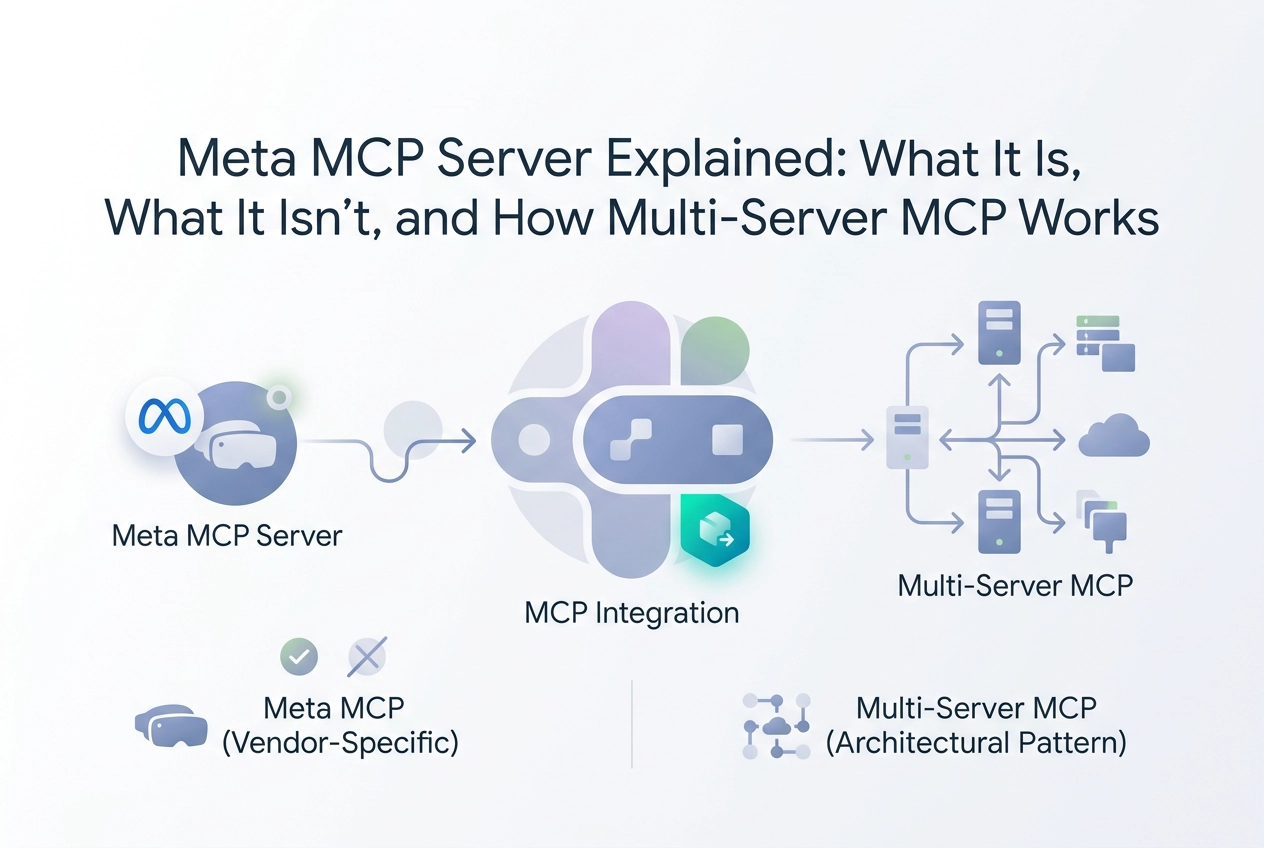
If you searched "meta mcp server," you probably landed here with one of two very different questions in mind. Either you want to know what Meta the company has actually built around the Model Context Protocol, or you are trying to understand how multi-server MCP architectures work at a broader level. Both questions are worth answering, and this post covers both.
Here is the short version: Meta's official MCP server is a narrow, developer-facing tool bundled inside the Meta VR CLI (metavr). It exposes AI coding agents to VR documentation search and connected device management for Horizon OS development. That is a useful but limited scope. The phrase "meta MCP server" has also taken on a second meaning in 2025, referring to orchestration layers that coordinate multiple MCP servers simultaneously, which is a genuinely different architectural concept.
In the sections ahead, you will get a precise breakdown of what Meta's MCP server actually does, how multi-server MCP setups function in practice, a direct comparison of vendor-specific versus platform-agnostic approaches, and a practical guide to building your own multi-server configuration. Let's untangle the terminology and get to the architecture that matters.
What Meta's MCP Server Actually Is
Meta's metavr CLI is a VR developer tool that ships with two distinct operating modes. Run it normally and it behaves as a standard command-line interface. Pass the MCP server flag and it becomes an MCP server endpoint that an AI coding agent can call directly.
The scope of that MCP mode is narrow by design. It covers two tasks: searching Meta Horizon documentation and managing VR devices connected to your development machine. That is the complete surface area. Nothing in the MCP mode reaches outside the Horizon ecosystem.
This matters because the architecture is a bolt-on, not a general integration layer. metavr was built for Horizon and Quest development; the MCP mode inherits every assumption that comes with that context. If you are not actively shipping on Horizon or Quest, the MCP server mode gives you nothing useful to call.
Authentication and access follow the same pattern. The Meta VR CLI documentation does not document a zero-signup path; check the official setup guide for current authentication requirements before integrating. That is a meaningful friction point if you are evaluating MCP servers for general agent use.
Tool discoverability is also limited. Whether metavr exposes a pre-call tool inventory is not documented in publicly available sources at the time of writing. The MCP specification does not require servers to expose a pre-call discovery list. An agent integrating with this server needs the tool names specified in advance or embedded in a system prompt.
The Meta VR CLI documentation confirms the dual-mode design. What it does not provide is a reason to use the MCP mode outside of Horizon development. That context is baked into every tool the server exposes.
What Most Searchers Actually Mean by 'Meta MCP Server'
Most developers landing on this term are not building VR apps. They searched "meta MCP server" looking for one of two things: a plain explanation of how MCP servers work, or a concrete server they can wire into Claude, Cursor, or Codex today. The VR CLI is a terminology collision worth naming rather than optimizing around. "Meta" here is ambiguous by accident, not design.
The core MCP server pattern is straightforward. A server exposes an HTTP endpoint. An agent client connects, discovers the tool list, calls individual tools by name with structured arguments, and receives structured results. That is the full loop. The Model Context Protocol specification formalizes this using JSON-RPC 2.0 over HTTP, but the mental model is: endpoint, tool list, call, result. For a fuller breakdown of that pattern, What Are MCP Servers? A 2026 Guide to Model Context Protocol covers the mechanics in detail.
The architectural distinction that matters is between a bolt-on model and a multi-server model. In the bolt-on model, one CLI or SDK ships one MCP server. That server exposes whatever the vendor chose to surface: no more, no less. In the multi-server model, many independent HTTP endpoints each expose their own tool namespace. The agent client connects to several at once, and the available tool surface is the union of all of them.
Locking an agent to a single-vendor MCP server caps its capability at that vendor's product boundary. If the vendor did not expose a tool for a task, the agent cannot perform it, regardless of how capable the underlying model is. The Backbone: Model Context Protocol (MCP) Servers covers how this plays out in production agent architectures.
The next section shows what the multi-server model looks like when you actually wire it up.
Multi-Server MCP Architecture in Practice
Here is what that model looks like when it runs against real endpoints.
Moltline Studio runs 22 hosted MCP servers exposing 160 tools, each living at a direct Streamable HTTP endpoint:
mcp.moltlinestudio.com/<server>
Paste that URL into Claude, Claude Code, Cursor, or Codex CLI and the tool list appears. No wrapper, no plugin, no configuration step beyond the paste.
No-Signup Free Tier
110 of those 160 tools require no account, no API key, and no signup flow. Operationally, that eliminates the OAuth dance, credential storage, and the setup gap between finding an endpoint and having a working agent. All twenty-two endpoints are listed publicly; the free tools are accessible the moment the URL resolves.
Each server covers a distinct tool namespace. One client connects to as many endpoints as the workflow needs, and authentication requirements do not bleed across servers.
Premium Access and the x402 Pattern
The remaining 50 tools are premium. An agent discovers the price automatically: it hits /api, receives an HTTP 402 challenge, and can settle on-chain with no human in the loop. Alternatively, the $19/month All-Access licence unlocks all 50 and is paid in cryptocurrency.
Agent Skill Discovery via SKILL.md
Before an agent calls a tool, it needs reliable context about what that tool does. Hallucinated tool usage is a real failure mode in production agent workflows. Moltline publishes 138 SKILL.md files openly at GarphenGate/moltline-oss on GitHub. Each file gives an agent structured context covering tool purpose, expected inputs, and return shape, before any call is made.
One Operator, Not a Marketplace
One person builds and runs all 22 servers. This is not a marketplace hosting third-party tools. That distinction matters for two practical reasons: reliability expectations are tied to a single operator, and when something breaks there is exactly one contact point. No ticket routing, no vendor blame diffusion.
Vendor-Specific vs. Platform-Agnostic MCP: A Direct Comparison
The two approaches diverge on every axis that matters to an agent developer. The table below makes those differences concrete.
Meta VR CLI (metavr) MCP mode | Moltline multi-server | |
|---|---|---|
Scope | Horizon docs search, VR device management | Whatever the 19 servers expose, across any workflow |
Authentication | Horizon developer account assumed | 110 tools, zero signup, paste a URL |
Tool surface | One CLI, one product's tools | 160 tools across multiple domains |
Skill discovery | No structured tool inventory for agents | 138 SKILL.md files on GitHub |
Premium access | No tiered paid model | $19/month cryptocurrency; x402 agent-native settlement |
Scope. Meta's MCP integration covers the Horizon/Quest surface. A platform-agnostic setup is bounded only by which servers you wire in.
Authentication. metavr is built for the Horizon developer ecosystem; confirm current authentication requirements in the official docs. Moltline's free tier has no such prerequisite: 110 tools are live the moment you paste the endpoint.
Tool surface area. One CLI producing one MCP server means your agent's reachable tools stop at that product's boundary. Twenty-two servers across multiple domains means the agent's tool namespace grows as you add endpoints, not as the vendor decides to expose more.
Agent skill discovery. No publicly documented pre-call tool inventory for metavr has been identified at the time of writing. Moltline's 138 SKILL.md files at GarphenGate/moltline-oss provide structured pre-call context that reduces hallucinated tool usage.
Payment for premium access. All-Access at $19/month (cryptocurrency) or agent-native x402 settlement at /api, details in Getting Started above. For answers on how these patterns interact in production, see the Frequently Asked Questions.
Honest recommendation. If you are building on Meta Horizon or Quest, metavr's MCP mode is the right tool for the job. If you are wiring Claude, Cursor, Codex, or your own agent to general-purpose tools outside the Horizon ecosystem, a multi-server platform-agnostic setup covers substantially more ground.
Getting Started with a Multi-Server MCP Setup
If the comparison above helped clarify which architecture fits your workflow, here is how to get a multi-server setup running.
1. Pick a client. Claude, Claude Code, Cursor, and Codex CLI all support Streamable HTTP endpoints. No plugin, wrapper, or middleware is required.
2. Browse the server list. Each of Moltline's 22 servers has a direct endpoint at mcp.moltlinestudio.com/<server>. The full server listing shows what each one exposes. The 110 free tools are available immediately with no account, no API key, and no signup.
3. Paste the endpoint into your client configuration. The agent discovers the tool list automatically on connection. For free-tier tools, no further configuration is needed after the paste.
4. Cross-reference against the SKILL.md files. The GarphenGate/moltline-oss repository on GitHub contains 138 SKILL.md files. Each file gives your agent structured context about what a tool expects as input and what it returns. Reading these before building a workflow reduces incorrect tool calls caused by ambiguous descriptions.
5. Run the agent-readiness checker. The free checker at moltlinestudio.com confirms your client is reading tool lists correctly. Run it before committing to a workflow architecture, not after you have already wired ten tools together.
6. Upgrade if you need the full surface area. The 110 free tools cover a broad range, but if you need all 160, the $19/month All-Access licence unlocks the remaining 50 premium tools. Settle in cryptocurrency through the standard checkout, or let your agent settle the bill autonomously: hit /api, receive the HTTP 402 challenge, and resolve it on-chain via the x402 path with no human in the loop.
The readiness checker and SKILL.md files exist specifically to cut the debugging that usually follows a first integration.
Key Takeaways
"Meta MCP server" names two different things. metavr's MCP mode is real and documented, but it is scoped entirely to Meta Horizon development. It searches Horizon documentation and manages connected VR devices. Nothing else.
Most developers searching this term want something different: a general MCP server they can wire into Claude, Cursor, or Codex. Treating the two as interchangeable leads to the wrong tool choice before any code is written.
The practical pattern for general agent workflows is a multi-server, platform-agnostic architecture. Multiple Streamable HTTP endpoints, each exposing its own tool namespace, with no shared auth requirement and no vendor lock-in. Moltline's multi-server setup covers that model, with a free tier requiring no account and no signup.
To verify the pattern works in your environment, paste mcp.moltlinestudio.com/<server> into your MCP client. The tool list appears immediately. No credential setup required for the free tier.
Before committing to a workflow architecture, two steps reduce wasted iteration:
See step 4 above for the SKILL.md workflow at
GarphenGate/moltline-oss.Run the free agent-readiness checker at moltlinestudio.com to confirm your client is reading tool definitions correctly.
All-Access at $19/month (cryptocurrency) or agent-native x402 settlement at /api, details in Getting Started above.
The decision rule is straightforward: building on Meta Horizon, use metavr. Building anything else, a multi-server approach covers substantially more ground.